The UI Design of Persona 5

persona0.png

More than 1.5 million units of Persona 5 were sold in worldwide since it was launched in 2016, and it is the best selling release in Atlus History. It has become one of the biggest success of JRPG in recent years, and people speak highly of this 5th game in Persona series.

Persona 5 for me is a story-heavy, turn-based game and the first time that I opened this game on the PS4 with a high expectation given from the internet, I actually was overwhelmed by the cutscenes and dialogues.  However, the creative and unique UI design is really something that can catch my eyes at the very beginning and make the game looks vivid with all the words shown on the screen. Players speak very highly of the UI design of Persona 5, and with the wonder of how it looks so good, I have tried to analyze the UI design of this game.

Oblique Angle Shapes

In persona 5, designers use a lot of oblique angle shapes for GUI, creating an irregular sense with a feeling of papercutting. Also, the font on UI is designed to be irregular sizes and in the middle of every title, there is one character with a reverse color square background.   Adding this different square into the title strengthens the irregular feeling of whole design.

persona1    persona2persona3

There is one character with a different background color in every title.

Serve the theme and story

The irregular shapes serve the story and atmosphere well. In Persona 5, all main characters are called “Thief”, who have supernatural power to steal hearts/desires from others. As superpower thieves, they are not normal people, the strong irregular style fits their identity. What’s more, in the past, thieves usually cut newspaper to make a letter without being identified his/her handwriting. In Persona 5, the game characters also cut newspaper out to make “予告状”, which is a notice letter to someone they are going to steal the heart/desire from. The whole UI style is similar to this kind of notice letter. What’s’more, the unstable feeling of shapes and fonts fits the theme of contortion of human nature.

persona4.PNG

予告状, the notice letter in Persona 5

Important 2D layout

When a lot of oblique angle shapes are used in the game, the layout of UI becomes very important. Persona 5 is a turn-based game, and in every turn during a flight, the players need to choose what they want to do, which means a menu is shown frequently.  When we look back at Persona 4, we can find that since the theme is about the television, designers imitated the old TV screen in UI and deliberately added a black frame, and it serves the theme very well. The black frame is helpful for grouping UI elements together. However, the battle menu at the left corner is far away from the character, and the characters statics icons take much space on the right side, which is distracting for players.    person2.PNG

Battle scene in Persona 4

The layout of the menu in the battle scene of Persona 5 is very clever and outstanding. Although the menu design doesn’t show a clear concrete theme, but the colors, fonts, and shapes have a very good thematic cohesion. Every button is designed as a long triangle shape, and all buttons point to the character that is in the turn, which is a clear indication for players. The triangles create a one point perspective on the screen and with a feeling of depth on the UI, the 2D design helps to provide a 3D feeling in the game.

person0.png

Also, the character is placed on the left, the monster is on the right, which allows players observe the scene without being disturbed by the menu. When more information is shown, such as HP/SP and dialogues,  the right side of the screen offers a good balance of the UI.
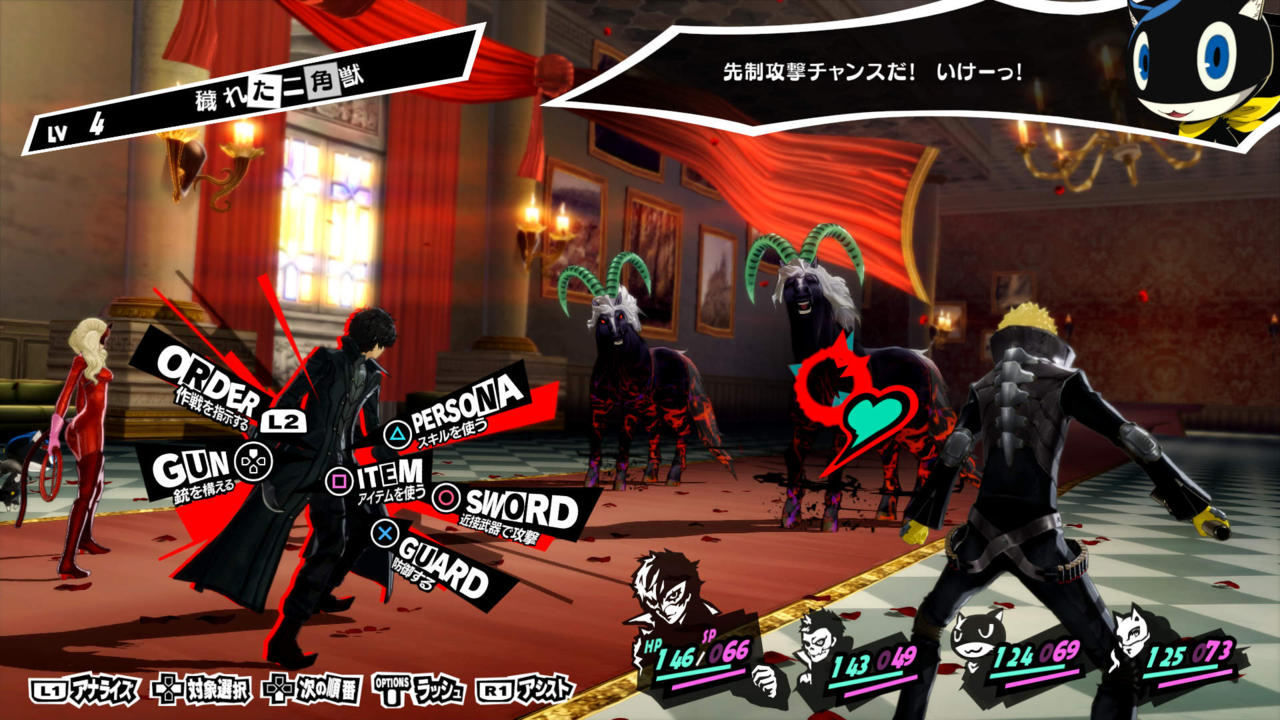
Image result for persona 5 fight

Battle scene in Persona 5

High Contrast Colors

The tone of UI is strong and vivid since designers use high contrast colors on every interface. The theme color of Persona 5 is black and red, and they are used thoroughly in the whole game. We can see black and red colors in all main menus and interface, such as the SNS interface, which is for characters sharing information like people do with a mobile phone.

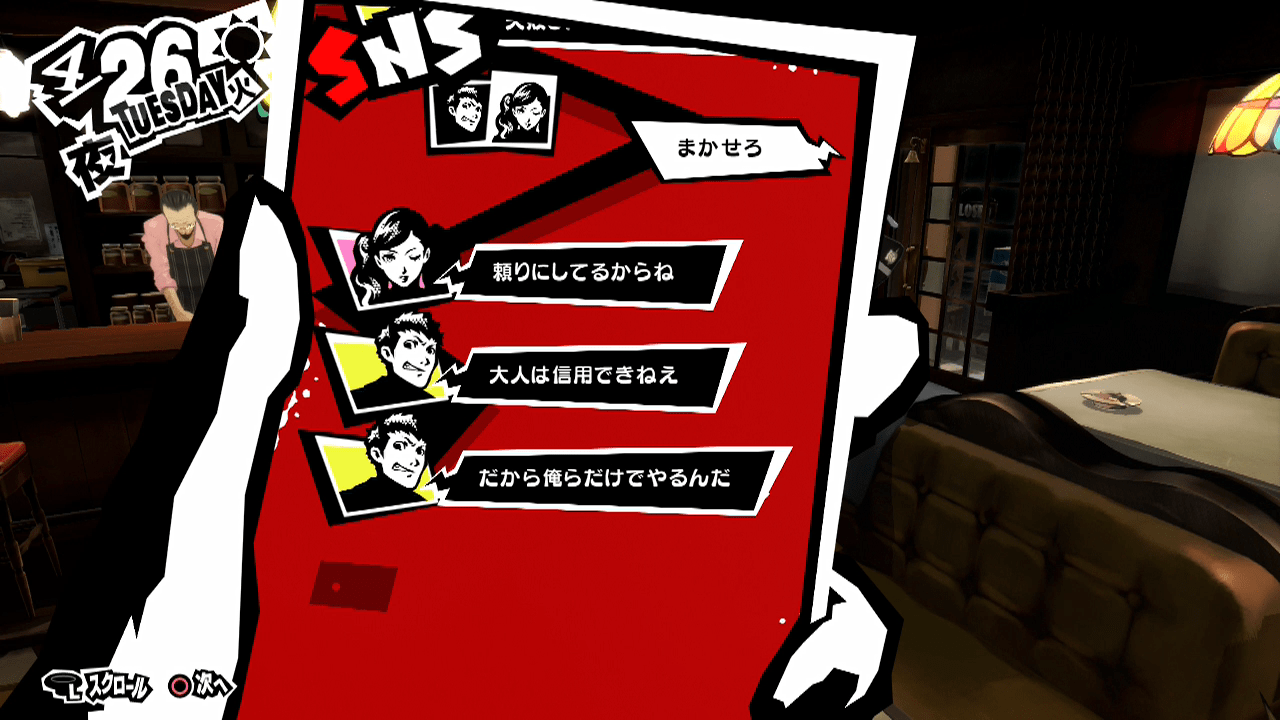
Image result for persona 5 menu Image result for persona 5 sns

Menu and SNS screen in Person 5

Thematic Cohesion 

Apart from theme colors, purple, green, yellow, red and other high saturation colors are used in other subinterfaces to distinguish the importance of menus but keep the integrity of the whole art style. The careful choices of colors help to create a unique Pop and graffiti style.

The use of oblique angle shapes and high contrast colors helps to create a perfect visual style for nearly all kinds of language, and this is why Persona 5 look almost the same in different kinds of languages. But of course, there is a trick of using English as big titles in all different versions, and as the big part of UI remains the same it is easy to keep cohesion.

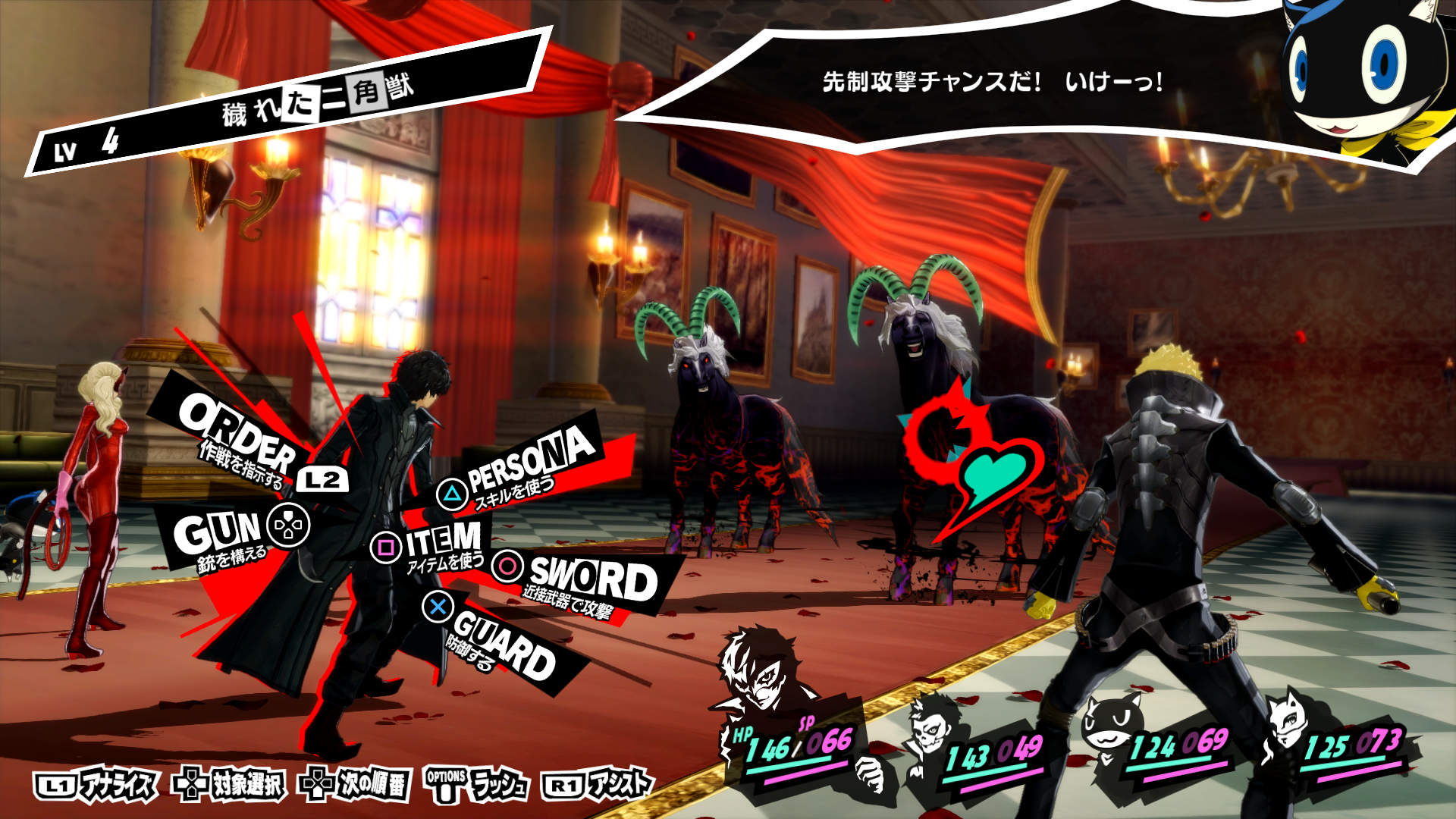
Image result for persona 5 menu fight

Image result for persona 5 fight japanese

persona6.PNG

The battle scene in English, Japenese and Chinese version of Persona 5 

The risk of using high contrast colors in all UI is causing tiredness of eyes after a certain time, and this problem does happen in Persona 5. But luckily, the frequency of using menu is not high in this game, and a lot of transition animations help to amaze players without being upset by the colors.

Image result for persona 5 menu  persona5.PNG

High contrast colors in all menus

Comic style

Persona series as a JRPG game has a strong comic style for arts and for Persona 5 designers apply the feature of thick borders in comics to the titles and texts. The thick borders not only make texts be easy to read in a certain box but also provide a way to keep content seem comfortable and harmonious in both 3D scenes and 2D scenes.

Classic comics have thick borders surrounding texts

person6 person7

Thick borders surrounding texts are used in 3D and 2D scenes

Transition animations

Indirect control and immersion

Persona 5 uses a lot of detailed animations in the game. Animations are in the transition between two menus, two scenes, and two days. For example in the battle scene, between the change of two camera angles from fighting to the menu, there is a sliding shape on the screen to make a fluent transition. What’s more, it drags the attention from top-right (the enemy position) to left-bottom (the character position) in an indirect way. By using this small animation, the game keeps an immersion in the battle.

2017-04-28_12-42-02

Battle scene animation

When the player calls out the menu, an animation of character will appear to bring out the menu. It uses the character’s hand to guide the player’s attention to the menu in the middle.

2017-04-28_15-09-10

Calling out menu animation

The transition between days and scenes are creative too. A knife is used to pin to the new day, and the background is the whole city changing from night to morning. In Persona 5, the date becomes important when you have a deadline of your mission, and the player needs to make a good use of every day to figure out how to complete the mission. Therefore, such kind of a long transition animation makes sense for letting players pay attention to the days.

2017-04-28_15-22-58.gif

Changing the date animation

The animation happens between scenes changes according to a different scene, such as if a player is going to a subway, then an animation of people standing inside the subway will appear. This kind of loading animation is much better than only blacking out the screen or only a spinning picture appearing. The animation responses to the story and it is simple enough to enhance the atmosphere without adding burden to the game.

2017-04-28_15-25-16.gif

Changing the scene animation

Rhythm of motion graphics

With a lot of motion graphics in UI design, it is important to control the rhythm of animation.  Take the main menu scene as an example. There are transforming shapes with blue and red color under the chosen button on the menu. Thre are also transforming on the background. Apparently, the stars transform slower than the menu animation. The faster animation on the menu helps to drag attention to the menu but not the background. However, as the background is moving unconsciously, the player gets a feeling of everything is active and things are changing fast. This kind of feeling keeps the player feel the tension and fast paced process in the game, and it can keep the player stay focused on the screen without quitting quickly.

2017-04-28_15-09-10

In the battle scenes and recap scenes, the animations keep running fast but detailedly (such as changing numbers and moving texts) and provide a fast speed feeling during the turn-based battles.

person8  persona9

Recap (left) animation and battle (right) animation

All these detailed animations in the game make Persona 5 a high quality unique visual piece of JRPG. These motion graphics contribute to the innovation of Persona 5 UI a lot. They not only make the game visually pleasing but also make the experience looks more fluently and immersively.

Inspirations for artistic and thematic UI design

As a story-heavy JRPG game, Persona 5 relies on the story a lot and players spend a lot of time on dealing with dialogues. As a turn-based game, players spend a lot of time on choosing what to do on menus. Therefore, the design of UI strongly affects the experience of the game. Persona 5 bravely chose high contrast color and irregular shapes as the theme and create detailed animations to make the game seem active all the time. Overall this is a successful example of how strong artistic UI helps to smooth and improve the game experience.

For RPG games, most of them try to “hide” the menu and UI as best as they can, so designers don’t put strong artistic elements into the UI. They prefer to make semi-transparent panels for menus and put them at the corners to leave space for the game scenes. Designers tend to keep the UI simple and as less as they can.

person10person11

UI in Final Fantasy XV (top) and in NieR: Automata (bottom)

For turn-based RPG games, the mechanism determines the game cannot work without many menus. However, normally designers still follow the simple and “less is more” principles. They make semi-transparent colors and rectangle shapes for UIs. In these games, UI doesn’t help to build up the theme a lot, they are only used functionally.

person20person21

UI in Final Fantasy X (top) and in Disgaea 5 (bottom)

Therefore, when we see the UI in Persona 5, we are amazed by how the UI helps to strengthen the theme and artistic environment a lot. This is a good example of using the UI design to improve game experience in turn-based games. Personally speaking, there are at least 3 things I can learn from Persona 5 for designing artistic and thematic UI for RPG games.

(1) Pick the right colors

Choose 2-3 colors as the themed colors, and consider the contrast of colors carefully according to the story and theme. Stick to the color tone and contrast strictly in every UI, and keep the cohesion even when you use other colors in secondary menus.

(2) Pay more attention to the layout

We don’t need to use a lot of semi-transparent panels in the game if we have a good layout to show the information. In most games, semi-transparent panels are used for reducing the distraction of UI and make the UI fit to the game scenes with any background. However, if you take good use of the screen then you don’t need to make big panels for UI. Such as in the battle scene of Persona 5, designers make the main menu stick to the character as arrows, instead of using a big rectangle panel for placing buttons.

(3) Animations can help a lot.

In Persona5, animations are used for guiding attentions, smoothing the game experience and strengthening the tension of the game.  Detailed motion graphics become an essential part of the game.

Of course,  UI design for different RPG game can vary a lot. The special comic and dramatic theme of Persona 5 allows it has a stunning and exaggerate UI design. The best UI design for games should be something serve their themes and stories well. Therefore, big panels and semi-transparent colors should not always be the first choice when we design UI for games.

Thoughts About VR Party Games

VR games have become a heated topic since 2016, and more and more gamers start to try out this new kind of games by themselves. However, for now, most VR games still focus on personal experience, creating one player games more than letting a group of people join.  Then have anyone tried to make a VR game for multiple players, especially a VR party game? If so, how did they design a game like this?


1. VR V.S Human

Image result for Keep Talking and Nobody Explodes

Poster of Keep Talking And Nobody Explodes

Image result for Keep Talking And Nobody Explodes

One player with VR headset is trying to defuse a bomb and other players with a manual are trying to offer instructions

The most traditional part of a party game is gathering people at a place, and encourage them to interact with each other for social needs.  VR social party games Keep Talking And Nobody Explodes uses a way as one person wears VR headset, and other people communicate with her/him. This is a game about the person with VR headset is facing to a bomb, and her/his friends have a manual for giving the person instructions to defuse the bomb. This design creates an information asymmetry situation for players — players in VR know a part of the game and players outside VR know another part of the game. By using this situation, the game pushes people to talk and interact.  The use of information asymmetry will be a very a way to design VR party game with only one VR headset. Since VR experience is a personal experience, which is difficult to share with others. Making the unknown VR world as a part of the game mechanism is reasonable and intuitive for players without VR headsets.

2. VR V.S PC

It is more common to combine VR and PC, and there are several interesting games in the market now.

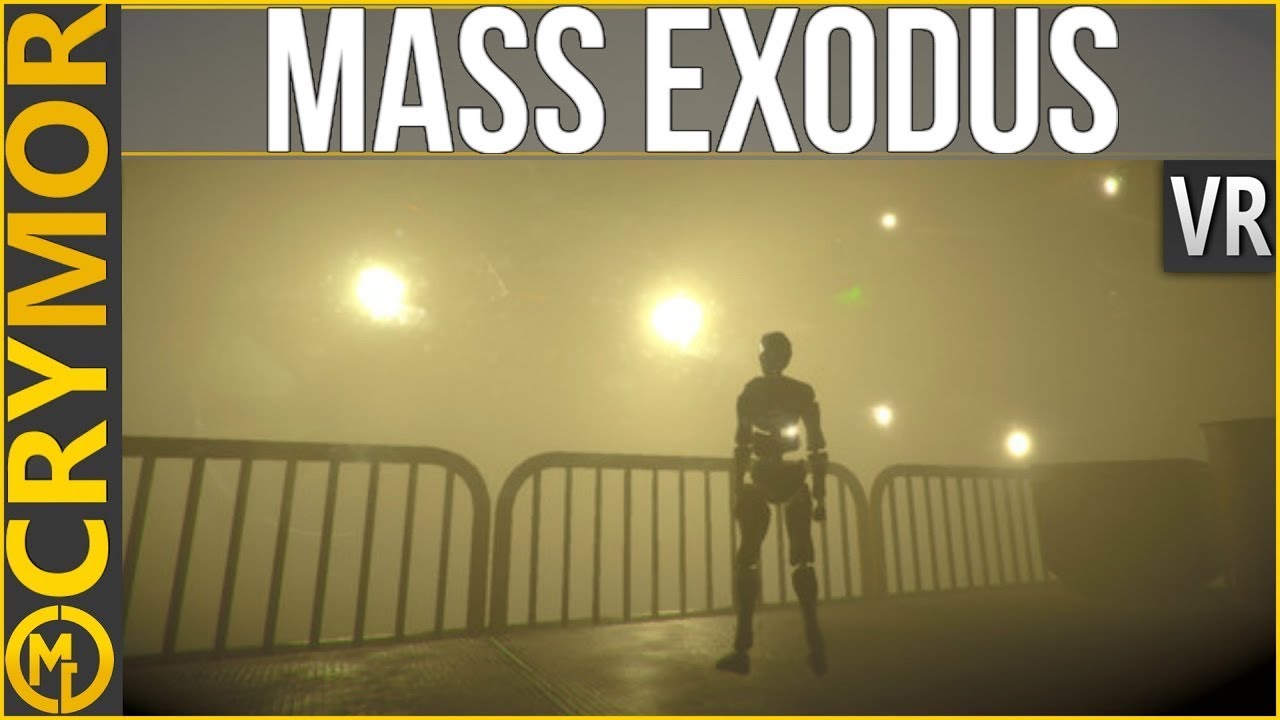
Image result for Panoptic VR    Image result for Mass Exodus VR

Posters of Panoptic and Mass Exodus

Panoptic and Mass Exodus are two games with similar mechanism — hide and seek. In these two games, the player with PCwill play as a character who is trying to run away, and players in VR  are trying to find her/him out.

Capture.PNG

A screenshot of Mass Exodus

The best thing for VR combining PC is that players can share the same realistic environment with the same information so that the synchronization of VR and PC can be very fluent. Take Mass Exodus as an example, the VR player looks at the factory environment from the top as a giant robot,  while the PC players are some of the small androids.  All players share the same environment, and they understand the structure and details of the factory at the same way. Players can easily be immersed into the game with the clear and realistic environment. What’s more important is that when they communicate during the game or after the game, it will be easy for them to understand each other even they used different roles and platforms.

However, the negative side of using PCs is the difficulty of everyone feeling socially connected at the separate screens. The fun of using VR is not unique in such party games, and it doesn’t offer anything more than a multiplayer PC game.

3. VR V.S Gamepads

Using gamepads to join the game with one VR headset is similar to PC V.S VR, but the social connection of using gamepads on one screen is obviously stronger. A good example is Ruckus Ridge. 

Image result for Ruckus Ridge

In Ruckus Ridge, three players use gamepads and share a big screen while one player in the VR

Ruckus Ridge is game for one of the players uses VR headset and three others use gamepads to compete in a series of minigames. This game offers a very good social connection during the play time since all four players stay in the same space, and they can directly talk to each other. Three gamepads players share the same screen, and they sit next to each other to compete. It can easily create an intensive and engaging environment. The player in the VR is a character who disrupts other players and stop them from winning the game. This mechanism encourages other three players not only compete but sometimes cooperate to get away from the VR player. It is a very inspiring way to design VR party game with only one VR headset. The greatest moment of a party game is when players feel exciting at the same time and react to the game together. Letting people stay close to each other and share instant information of the game at the same time is a good way to help players build up social connection in a game.

3. VR V.S VR

The coolest form of VR party games, for now, I believe is all players wearing VR headsets and playing the game together in VR.  Not many game designers try to do this risky design since the VR headsets are not as popular as other entertaining devices. But there are still some examples we can find, such as Star Trek: Bridge Crew.

Image result for Star Trek: Bridge CrewImage result for Star Trek: Bridge Crew4 players cooperate together to control a space ship in VR game Star Trek: Bridge Crew

In Star Trek: Bridge Crew, four players sit on a spaceship and they cooperate as a team to explore an unknown space in hopes of locating a suitable new home world. Every player has a different position to control a different part of the spaceship. During the game, they need to communicate and make decisions together, just like a real spaceship crew traveling in an unknown universe. Everyone has an avatar in VR, and they act like what you actually do in real life. It sounds like the perfect future of VR game, and I think it will the normal form of party game and other multiple players game in the future.

Conclusion:

For now, the biggest restriction for designing a VR party game is the problem of devices. The most stable and good quality VR devices we have now are big, inconvenient and expensive, which means it is not easy for multiple people to join the VR world at the same time. Therefore, most VR party games are designed for using only one VR headset and people taking turns to try the VR part. Such designs can easily reduce the fun since the VR becomes an unnatural part as it seems to have more advantages than usual PCs or consoles.

What’s more, for most people, VR technology is still new and unfamiliar to them and the most attractive part of it is still the immersive environment and complicated virtual interactions. This becomes a reason for VR game developers and designers focus more on building amazing VR worlds for personal experiences but not social experiences.  On my opinion, only when VR technology become popular enough as people can accept it as usual technology in daily life, the design for VR party games will have an obvious progress.


Non-diegetic UI Design for VR Games

In traditional digital games, players are familiar with all kinds of UIs for helping them understand and control the game. In 2009, Erik Fagerholt and Magnus Lorentzon brought up the terminology for UI in digital games.

无标题.png

Terminology from Fagerholt, Lorentzon (2009) “Beyond the HUD – User Interfaces for Increased Player Immersion in FPS Games”. Master of Science Thesis, Chalmers University of Technology

In their article, they specially divided the UI according to whether they are diegetic or not, which means whether they are inside the virtual world or not. Normally, for non-diegetic UI, designers put them at the front layer on the screen and they are usually 2D panels and icons. These representations offer important information for players to continue the game and follow the rules.

However, when we try to design UI for non-diegetic purpose in VR, do we only need to do the same as games with screens? Obviously, there are several different things we have to pay attention to:

1.Size of GUI canvas

In traditional board games, since the screen size is fixed, designers have a certain area to consider. They usually arrange the 2D UI elements along the edges and make them as simple and small as they can. Because the main content of games happen in the center, and the UI is always on the screen. In order to avoid the UI blocking players’ views, the design should leave large space for the center.

无标题.jpg UI of Assassin’s creed
212fmty.jpgUI of Clash Of Clans

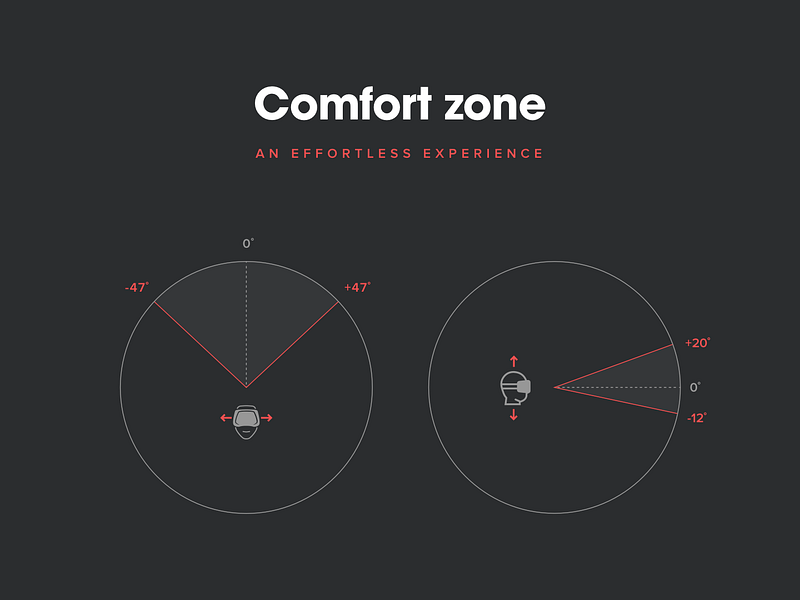
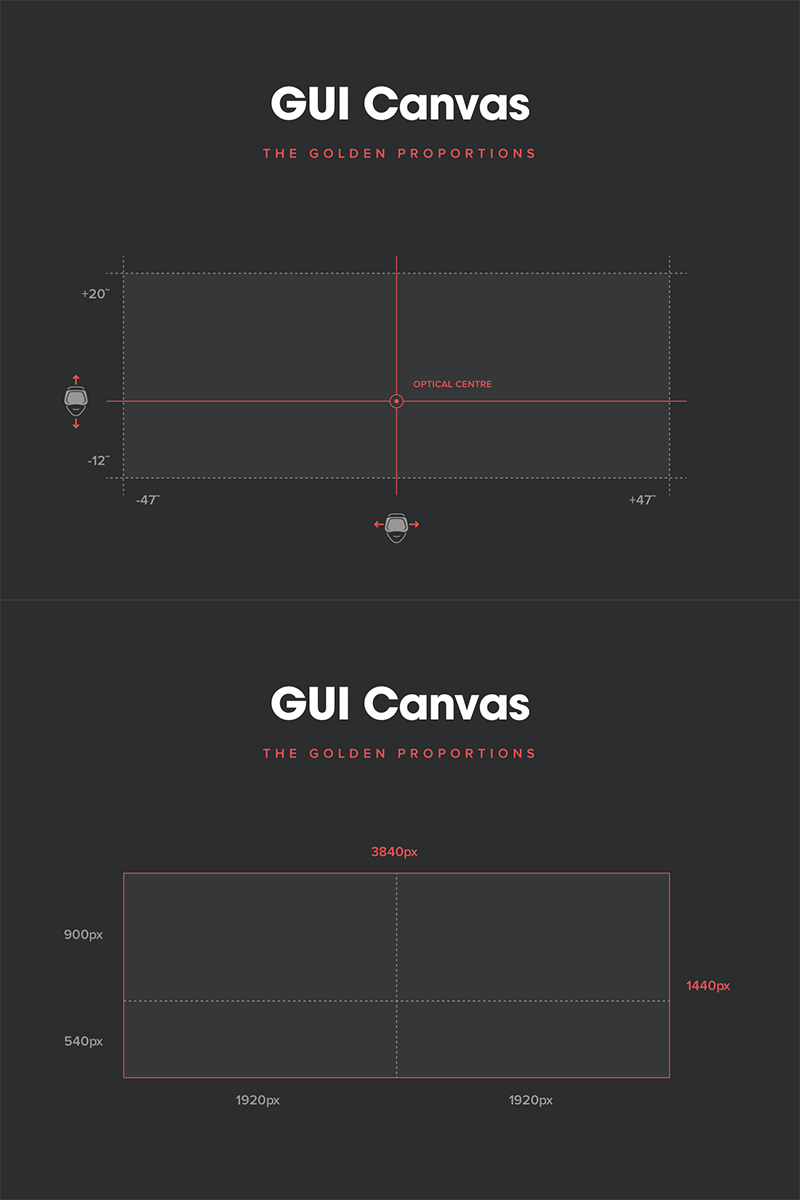
In VR world, the view of player is not limited in a 360 degrees environment. Therefore, the first step of designing UI should be figure out the area and size of UI canvas. Some designers have already conducted tests inside VR and tried to find out the principle for UI canvas. Mike Alger indicated that the users have comfortable viewing areas inside VR world in his early research, and interface should operate within a 94 degrees horizontal space and a 32 degrees vertical space. In terms of 2D perspective, the suggested canvas size should be 3840 X 1440 px (From Sam Applebee’s post — Virtual reality: Templates for UI design in VR in 2016).

However, if we consider the distance between users and interfaces together, then the size of the canvas need to be adjusted according to the place.

2. How to interact

For games with screens, the ways to interact with GUI are limited. Players either use buttons to select (like PS controllers and keyboards) or tap on the screen directly (like mobile screens). In VR environment, the situation is totally different. In conclusion, I think there are three ways to interact with GUI based on the devices we have now. The first way is using gaze to select and using buttons to confirm, such as Google Glass. The second way is using a laser pointer to select and a button to confirm, such as HTC Vive Menu. The third way is using virtual hands to touch the UI directly.

The first way is more suitable for simple GUI design, and especially when the interactive UI elements are not many. Such as Gunner for Gear VR, the only interactive UI in the game is the crosshair. Players use the crosshair to focus on enemies and press buttons to fire.

Gunner-Screenshot-4.png

UI of Gunner

The second way is more suitable for complex UI, and the UI with small buttons and detailed interactive elements. Such as in Hover Junkers for HTC Vive, players interact with the interface with a laser pointer from their fingers.

无标题1.png

UI of Hover Junkers

The third way is more suitable for 3D UI. Instead of 2D panels and buttons, in VR world, we can design 3D objects for representations. 3D object UI blurs the boundary between non-diegetic UI and diegetic UI since usually 3D object UI are designed to fit into the game world even though it has the same function as 2D non-diegetic UI. Using 3D object UI is helpful for building up an immersive environment, but it will take more room and be more complicated to interact. Such as the scene of selection UI in Job Simulator for HTC VIVE. Players need to insert a tape, which represents a scene, in a machine and move a handle beside to confirm.

无标题2

Scene selection UI of Job Simulator

3. Gather UI elements

As we mentioned before in this post, UI elements in traditional digital games are usually along the edges of the screen. However, in VR games, if you put the UI elements around players’ views, players might feel uncomfortable as something is always blocking their view. Therefore, except for special reasons, designers usually put UI elements on a certain fixed area or hide them when they are not needed.

Designing UI for VR is still a new area to be explored, and many designers have been working to figure out the common principle for 3D UI design. As designers for UI/UX, it is important to think about the differences between traditional UI and 3D UI to prepare for the coming VR generation.

Social Interaction in Virtual Reality Board Games

Recently, I have been working on a project about creating a board game in Virtual Reality. I particularly focus on social interactions between players in this project, since I think it is the most difficult part to design when we try putting a tabletop experience into Virtual Reality.

Interactions in traditional board games

We analyze interactions in traditional board games and try to figure out what kinds of actions are initial and essential as well as what kinds of actions make people feel engaged during games. We searched for papers that can be helpful for understanding the interactions, and we learned a lot from the essay Chores Are Fun: Understanding Social Play in Board Games for Digital Tabletop Game Design (by Yan Xu, Evan Barba, Iulian Radu, Maribeth Gandy, Blair MacIntyre, Georgia Institute of Technology). Inside this essay, the authors compiled a table for social interaction behaviors of players.

%e6%97%a0%e6%a0%87%e9%a2%98

From this table, we could know that verbal communication is important and players build up their connections based on talking and discussing. We can see that many game elements serve to lead players to communicate instead of playing on their own.  The verbal communication can be divided into 3 parts according to different purposes: 1- Communicate for clarifying rules. 2- Communicate for winning the game. 3- Communicate for fun (like joking or chatting during waiting time).  For 1 and 2, the communications are based on the game objects. When players talk about the rules, they usually hold the rules and/or objects to show what they want to explain. For 3, what players need to see each other, and especially the facial expressions. When people joke or chat, they are doing natural socialization as in their daily life. They expect to hear and see others’ responses and laughter. Therefore, to serve the social interactions inside board games better, we need to pay attention to offer enough room for players to communicate. We need written rules to review and game objects to interact with.  We also need to design comfortable conditions for players to talk freely.

Constraints of Interaction in VR

      For now, VR is still a new and unfamiliar technology for all of us, and many people are still exploring the possibilities inside. Even we have different headsets to access the VR world, but none of them seems completely satisfying.  The main constraints of VR for now are accuracy, space, detailed human simulations and natural responses happen between players.

Accuracy is about when players want to move, pick up or put down game objects, whether the VR world gives the exact response to them. One example is when there are several small objects in front of the player, and s/he wants to pick up a certain one, sometimes or often s/he would get another object that is near to the one s/he wants.

Space is a big concern for VR headsets now. No matter Oculus or HTC VIVE, they offer players a good sense of interactions and accuracy, but take away the freedom to move around at the same time. The detection of positions limit the actions of players.

When I mention about detailed human simulations, I especially point at the facial expressions detection. During Oculus Connect 2016, Facebook showed us an amazing Social VR demo about you could see your friends’ avatars with detailed facial expressions on their faces. The main changing parts on the avatar’s face are eyebrows, eyes and the mouth.These three elements help to convey different feelings well.

socialvr.jpg

Facebook Social VR Demo

Natural interactions are about the interactions between two avatars. Daydream Labs from Google has been working on positive social experiences in VR, and they showed a demo of two avatars doing high-fiving in VR on the Internet. From the video, we can see that when people do high-fiving, an obvious sound effect and sparkling particle effects will appear. Daydream Labs explained that “If you want people to interact in positive ways—like high-fiving —try giving them an incentive.” This kind of interactions have received positive reaction from users, since they let players have a connections by “touching” each other. However, these interactions are still under development, which means they cannot be used widely.

daydream.png

High-fiving in VR

These constraints of interactions in VR affect the design of VR board games a lot.  When designers make board games for VR, they are limited to the accuracy, space, absence of facial expression and lack of physical sensing.

Examples of Virtual Reality Board Games

There are not many examples as VR board games in the VR market now, but during the research in our project, we still found several examples to investigate how they offer social interactions in VR for board games.

Lost Cities VR

lost city.png

Screenshot from Lost Cities VR

Lost cities is an award-winning tabletop card game designed by Reiner Knizia. The Campfire Union has translated this game into VR as a two-player strategy game. In this game, players need to figure out the numbers and colors on cards to play and compete with each other. At the first version of Lost Cities VR, it only allowed one player to play against an AI in the game. In this case, the player doesn’t need to communicate, what s/he did was just placing cards on the board using a touch pad for Gear VR. Later, in the second version, the “play it with friends” function has been added into the game. Now, players can play the game with a friend through networking, and they can see their friend as a 3D avatar with a head in the VR world. Instead of playing the game silently before, the voice chat function allows two players to talk freely in the game.  Therefore, in Lost Cities VR, the main social interaction is verbal communication. Since there is not anything to indicate information on the board, such a virtual hand or a pointer, players communicate with each other for the game and for fun only with voice.

Tabletop Simulator

1

Screenshot from Tabletop Simulator

Tabletop Simulator is a virtual reality simulator of board games. It has classical board games like Chess, Poker, Jigsaw and son on, and it allows players to create their own games by importing images, 3D models, scripts and other elements that are needed. This game is more like a simulator tool in VR. Inside the game, players can see controllers and headsets as the physical ones, and these are the avatars for players. Player can also press button to use laser pointer in the game to point at details. Inside the game, it also offers voice system for chatting. The social interaction in Tabletop Simulator seems satisfying, when the gamer offers 3D interactive game objects just look like real objects in physical worlds and a pair of controllers to represent your hands. In this way, players can interact as they usually do in real world.

Mask of Anubis

mask

The Contents of Mask of Anubis

Mask of Anubis is a mixture of VR and Tabletop games. Players cooperate to create a right map for getting treasures inside a pyramid with the 3D environment hints in VR Goggles. Therefore, during the game, one person is in the virtual world while others listen to his description to make the map. After one minute, the VR headset should be passed to another person. The position in VR world will change, and the new VR player will see different information. After all players have done their description, they can combine all information together to make a full map. In this game, players communicate with voice and natural body language since they are in physical worlds. Mixing VR with board games can expand the experience from boards, but it seems that it is still a traditional board game.

From these examples, we can know that designers have tired different ways to combine VR and board games. For the social interaction part, some games only focus on verbal communication, and others try to simulate physical environment and situations in VR world. Nearly every game offers voice system to enable verbal communication between players. The interactions with game objects are different in different games. Some games let players interact with VR controllers, like using controllers to touch, grab and point. This is an intuitive and direct way. Some games let players interact with touch pad, buttons or joysticks. This is a technically safe and traditional way.

Most games limit the area of activities to fit the constraints of space. For solving the problem of accuracy in VR world, some games use a tool, like a laser pointer, to help players make micro interactions. For now, the technology of VR cannot support to simulate the movement of the body and facial expression. Therefore, none of the game chose to create the detailed face or whole body of humans, but they create an avatar with only head and hands. After observing players playing these games, actually, we can see that players interact with each other by gestures and gazes well. As for physical sensing, some games use the vibration of controllers to give responses to players. However, most games did not design much for this part.

Thoughts about solutions 

When we design the interactions for VR board games, if we only focus on verbal communication, the fun of interaction between players cannot be fully translated into VR, and especially when players feel constraints of movements.

In our VR board game project, we divide the interactions into 2 levels: Low Level – interactions with the game (making movements, send items and game specific interactions) and High Level – interactions with another player (chatting with each other, discussing the rules and strategies). For the High-Level interactions, the constraints of VR interactions make us need to seek solutions for offering indirect social interactions.

Considering the technical barriers we have now, we cannot offer a comfortable experience for players interacting directly with each other. However, we can encourage players to interact by using game objects, such as instead of touching another player by hands to attract her/his attention, the player can throw a ball to hit her/his avatar. Hitting gives a more obvious and dramatic visual effect with strong sounds in the virtual world, and it helps people notice others without physical senses. There is a multiplayer experience for Oculus Touch called Toybox, and inside this demo, we can see that two players can use different 3D objects to do social interactions without touching each other’s avatar. It is a good example for exploring the possibilities of social interactions in VR.

toyboxtoybox2

Screenshots of Toybox

For strengthening the social interactions through game objects, we need to design the visual effects and sound effects to give players natural and satisfying responses. The objects in the virtual world should be concrete and convincing. We need to make sure that players understand how to use the objects.

For the future of VR board games, when we can design them without thinking of the constraints of space, accuracy, simulation and physical sensing, we should still consider the difference between virtual world and physical world. If we simply simulate the board games in our real world into VR world, we do not make a good use of the virtual elements. Based on the natural and common social interactions we have in real life, we can consider designing interactions that are impossible in the physical world, such as sharing information by audio-visual ways instead of only verbal communication.

Social Interactions between two players

Imagine you need to design a game for two people and only for two people, what kinds of interaction you will design for the game? And what if the game is a VR game, what kind of interactions you are thinking of? Are they different from the answer to the previous question?

Social interactions from games

To answer questions like these I think we need to figure out what social interactions we have in different kinds of games.

  1. Physical game

clapClapping game is a good example for only two players play together. It is a game about two people following a certain rule and making physical interactions. The goal of this game is to finish a set of movement together successfully. Physical touch with each other is a direct interaction between two players, like clapping hands and high five. There is a kind of game called “Finger-guessing game” from Asia popular culture is also based on direct interaction. However, instead of touching each other, players use gestures to interact. Normally, different gestures represent different meanings, and players use gestures with meanings to play the game. For example, Scissor-Paper-Rock is an easy and basic form of Finger-guessing game. Physical games encourage two players to touch or use body movement to interact.

  1. Board game

board-games-quiz-crop.jpg

Board games have boards, chess, tokens and other game objects (of course!), therefore, the interaction in board games between players are mainly through game objects. If it is Chess, we use pieces to conquer and attack. If it is an RPG board game, like Betrayal at House on the Hill, you use a figure to represent yourself as a character in the story and help or attack other players using cards and tokens. Game objects become a media to communicate so that players can interact with each other in an indirect way.

But as a kind of game has highly social elements, the interactions over during games are also necessary. The essay Chores Are Fun: Understanding Social Play in Board Games for Digital Tabletop Game Design (by Yan Xu, Evan Barba, Iulian Radu, Maribeth Gandy, Blair MacIntyre, Georgia Institute of Technology, ) compiles a chart for social interaction behaviors of players.

无标题.png

Verbal communication plays an important role in board games. Even it is a two- player game, players still want to talk about the strategy, the situation and sometimes make fun of each other. Face to face communication is one of the most interesting parts in board games. What’s more, in some games, when players don’t speak, their facial expression is also a way for social interaction in the game.

  1. Video Game

In video games, players mostly interact with each other in digital devices, controlling the avatars or characters. In these digital worlds, they have a limitation of interactions, and they can’t interact as they do in real life.

%e6%8b%b3%e7%9a%87   %e9%ad%82%e6%96%97%e7%bd%97

However, players still find rich interactions in these games, especially when many games try to simulate realistic worlds. In digital games, the difference between competition and collaboration is clear. From the game screen, you can tell either two players are playing against or with each other. In competitions, players fight with each other directly or perform same takes to see who can be better. In collaborations, players fight together against enemies or they communicate to solve puzzles together. In the essay, A Framework for Cooperative Communication Game Mechanics from Grounded Theory(by Zachary O. Toups1, Jessica Hammer2, William A. Hamilton3, Ahmad Jarrah1, William Graves4, Oliver Garretson5), a framework of collaborative communication shows different types of possible communications in multiplayer digital games.

无标题2.png

From the framework, we can tell that players interact in 3 main aspects: they change the environment and game objects for conveying information to others, they choose preset messages to express or they move characters. All these interactions are limited to verbal communication.

Social interactions in VR

Social VR seems to become a heated topic. As people tried to find a way to build social networking before, now they try to find a way to reveal social possibilities in VR. VR offers a vast imagination for developers and designers to think about social interactions. It can simulate real life but not be limited to distance or time. Therefore, for interactions in VR games, it seems like we have a potential to compile interactions from physical games, board games, and video games. Players can change environments and game objects unlimitedly, and also communicate verbally. They can control avatars by doing same actions in real life.

However, due to the technical barriers in VR at present, we have some problems when we try to implement the interactions we think can work in VR. For example, the sensing problem is a big challenge. In physical interactions, people can sense the hands, the strength and the physical responses. But in VR, nowadays the things we sense are limited to hearing and vision, which will cause distortion to players when simulating the realistic interaction in physical worlds.

Therefore, when we think about social interactions for games in VR, maybe we still need to explore the indirect and non-physical ways as board games and video games do. There is a demo experience called Toybox for Oculus Touch, in which two players can play together with different kinds of toys in real life. Players have fun with each other by using toys as a media and also verbally communicate to interact with each other

oculus-toybox-650x325.jpg

Another idea about VR social interactions is designing things more than just simulation. Imaginary worlds can totally happen in VR, think about Harry Porter and all the fantasy novels. What about when people want to show others a puppy, they draw it out and it can become “alive”, moving by itself? The interactions in VR world can be expanded and exaggerated with the unique features of VR technology.

When Traditional Board Games meet Virtual Reality

Virtual Reality, as a new technological method for creating an entertaining interactive experience, is still underdeveloped. Game designers are still looking for new possibilities and new opportunities inside virtual worlds. Some of the ideas are trying to merge our familiar traditional games into Virtual Reality environment, and one kind of the traditional games is board games. However, from some existing products, we can clearly see some Pros and Cons in these attempts, especially in the interaction part of the games.

The Restrictions of Controllers

1.png

Tabletop Simulator VR

Tabletop simulator VR is a VR game where you can play virtual board games with you friend. It simulates the physical environment for board games as in real life, which means objects would drop because of the gravity, you can place objects anywhere you want and so on. It seems this game aims at offering the realistic experience for players to play board games.

This game is played with HTC Vive headsets and controllers. In the virtual world, players use buttons on the controllers to pick up, move, click or do any other interaction with game objects inside. When the objects are close enough, players can move them by using virtual controllers to directly touch them. The controllers can also generate a pointer laser to interact with objects far away.

2-1 2-2

Buttons and laser pointers

It brings out the problem of accuracy in virtual board games. Some kinds of objects are small and require detailed interactions, such as spinning dice. And once the accuracy and randomness don’t work well, it is difficult to continue the game. Using controllers to execute such actions are doable, but there are conflicts between physical response and detailed controlling. Take Domino as an example, it requires users carefully placing blocks in balance, or it will fall down easily. In VR simulator, it simulates the difficulty of keeping balance but lacks the physical feeling of players’ hands at the same time, which causes the game nearly undoable in VR.

Another important problem of controlling objects is distance. In the real world, it is natural to stand up reaching out the things far away. In the virtual world, space is limited and it is unsafe for players to move a lot (especially with HTC Vive). In this case, the laser pointer seems to be the best practical solution. However, it increases the unnatural and unintuitive feelings in controlling objects. It takes more time for players to aim at small objects and place them at an ideal place.

Play Games Face to Face

One of the attractions of board games is playing it with others face to face, making it a social activity. Simulating real people in virtual environments has become a heated topic since VR was born. A lot of different teams have worked on it and produce different prototypes, including Daydream Labs from Google and Social VR from Facebook. The essential part of representing people in VR is expressing their emotions through avatars. But this part can cause a lot of time and energy to achieve the goal. This is one of the toughest problems I think will be for board games to solve in VR: how to make players communicate and interact with each other emotionally?

In Tabletop Simulator VR, the avatars are just 3D models of headsets and controllers. In Lost Cities VR, avatars are comic characters, which have more details and more possibilities. But since the avatars are AI in the game, so they are just moving in patterns. We still cannot feel the emotions from them.

3.png

The Avatar from Lost Cities VR

By now, the best way to fulfill this aspect may be simulations of eyes and hands (like what Daydream Lab do) combining with voice chat.

Visualize the Imagination

It is very easy to understand people’s desires to visualize the imagination during playing board games in VR. Players feel amazing to see the huge flying dragons, the dark dungeons and the swords in their hands once they are immersed in the game world. New problems will pop up immediately: How much freedom can players have when they interact with the environments? How much should be visualized in the game to make workable?

In Tabletop Simulation VR, game designers offer a function for players to scale down their avatars’ sizes so that they can go into board game worlds that they have built directly. It feels like make yourselves as small as game objects and then you can see the objects moving with simple loop animations. Players will fell exciting to see huge moving board game objects, which used to be small and static in real life. But the interaction of games stays the same, which is using buttons or laser pointers to move objects. So, this is just a purely physical change, and the immersive feelings for players may more like looking around with nothing else to do. The immersive interaction doesn’t communicate with the gameplay.

4-1 4-2

The vision of the board game

In Lost Cities VR, the environment changes according to players move to different cities on the map to play card games with different characters. It feels interesting to offer players various environments based on the story in the game. However, since this game is designed to be a card game playing with numbers and there is no mechanism for interaction with the environment, such as the environment changes due to decisions from players. Once the game lasts for a while, players will feel the environment doesn’t matter anymore.

5-1 5-2

Environments change at different locations

Nowadays, limited to the technology, converting board games into Virtual Reality games can cause a lot of problems. To some extent, Augmented Reality may be more suitable for board games for now (examples are like HoloGrid and Roar!). But in my opinion, as Virtual Reality changes over time, the restrictions will be broken down, and players can be transferred to explore a virtual world freely finally.

Emotional Interaction In Interactive Fiction Games

It has become a usual situation that game designers are warned about using as few words or dialogues as possible in video games since humans prefer visual things. But what if a game really focuses on words and dialogues? And how will it be made to interact with players in an emotional way?

Actually, it is a question I thought about when I was reading the “Less Talk More Rock” by Brandon Boyer, in which article Boyer points out that “Written and spoken communication is a beautiful thing in and of itself. However, with video games — a primarily audiovisual style of communication — talk can be disruptive, it can undermine. In this context, talk is noise.” It reminds me of some interactive fiction games, and the first example of making a video game with words and writings came to my mind was Lifeline.

1

When Lifeline was released to the public, it received an overwhelming welcome. In App Store, it got many 5-stars reviews and was recommended by Apple for several times. Then what is the magical power of this game with bare words inside?

Waiting is meaningful now

The biggest interesting and innovative point of Lifeline is using the waiting moment as a mechanism in a game at the first time. Many of video games have their waiting moments, either short or long, but most of them are caused by technical problems (i.e loading time) or strategic problems (i.e waiting for healing, and in most games you can spend money to shorten this part of waiting). These waiting moments have no contribution towards games and designer would do their best to satisfy players in case they feel boring. For loading time, designers put animation, pictures, and music. For waiting for recovery time, they would guide players to play previous content or some additional contents. But in Lifeline, the waiting moment becomes an important role in the game. In Lifeline story, Taylor is an astronaut who is trying to find a way back home after crashing on an unknown planet. Taylor accidentally contacts you and asks you to help him make decisions until he is rescued. Lifeline has a perfect environment for letting players wait, because Taylor needs to explore, walk and sleep, and he is in outer space where everything is unknown and uncertain, including the signal. The waiting moment really makes sense and it even helps players to be immersed in the story. One more thing is very impressed that, as Lifeline is a mobile game, the newest messages from Taylor will be displayed on notification in mobile devices. This makes the whole game get into players’ real lives as they can receive messages at any time, and it also makes the whole thing feel like more personal. What’s more, by using messages and texts, it allows players play the game in any kind of situation. Combining the waiting time, every time messages coming in can become an exciting moment for players.

2

Talking to a real person

As an interactive fiction, words are essential to this game. I could feel the caution and patience from the dialogue writer when I was looking at Taylor’s messages. Most of the messages are sent to players in one sentence, it is comfortable and easy to read. After a few sentences, players need to respond by choosing an answer from two choices. I notice that not all the answers will affect the story, but some of the answers are more like chatting or communicating with Taylor as a real person. These answers not only help to keep players paying attention to the game as they need to tap on the screen, but also help to build up the relationship between players and the character.

3   4

Some messages from Taylor fit to the situation that he describes in the story a lot, and the words just seem like a friend might send to you. The writers chose words and expression carefully to make players believe it is a character with intelligence. All the emotional sentences, questions and answers gradually personalize the virtual character and attract players go on the game.

What’s more, the interface of the game is simple but clear with its art style. Dark color background and cool blue text make a contrast for reading texts easily. Using blue instead of all white makes the interface has a cool tune fitting to a lonely outer space story. Simple decoration such as the screws and the little speaker, make a communication environment.

What I think matters

Another big mechanism for Lifeline is making choice and answering to Taylor’s words. Every time you make a choice, it will affect the next step for Taylor and even affect his ending – successfully go home or die lonely on the planet. Taylor’s response to players’ choices satisfies them as an “advisor”. Even the answer is not a choice, Taylor will response to you in a vivid and humanistic way, which sometimes turns out a surprise to the players. Even if Lifeline lacks visual, audio or physical response to the players, it makes the full use of words and dialogues.

As a word-based adventure game with an environment on a foreign planet, Lifeline requires players’ imagination. Using Taylor as a leading guide to tell players everything on the planet is a better way for them to experience comparing to use objective description. Because it can let players forget about objective details but focus on emotional experience, making them have a sense of being involved in the story.

5

Make an emotional interactive fiction

To conclude for Lifeline, the new mechanism, the personal dialogues and the humanistic response in the game are key factors for building the emotional interaction. Besides Lifeline, there are actually some other interactive fiction applications for mobile devices, such as Device 6. But Device 6 uses a more visual expression to help finish the storytelling. The creative interaction with mobiles and interfaces makes words more attractive and emotional.

76

The Interactive fiction game as a special kind of video games challenges designers a lot about how to combine emotion and interaction, but some good examples have already proved that it can totally work in traditional interactive entertainment technology. However, as the generation of Virtual Reality and Augmented Reality technology is coming, if some designers want to develop interaction fiction with new technology, it will challenge a lot more but also may be a chance to create a whole new interaction way in the future.